
Month: May 2011

  • Playfull Problem Solving

    Me not writing a blog post

    I haven’t written much for a while because as soon as we got to San Francisco we got crazy busy. We have so many friends here it’s hard to find the time for things like blog posts. I’m having enough trouble finding the time to do development.

    I also haven’t taken any pictures apropos to this topic so I’m just going to pepper it with random snaps from our time in SF. This blog is also about travel after all. Anyway, one advantage of having so many people around is that I can run experiments on them.

    I’ve been interested in problem solving for quite a while. Specifically, the difference between just sitting down and thinking out a problem versus playing around with it and trying to tease a solution out. To get a feel for how good we are at just thinking something out I devised an experiment and tested some fellow indies.

    Sarah and I work during the day at a workspace we share with some other SF indie game makers. It’s nice to be surrounded by peers and their good ideas and it’s also a convenient space to hang ropes. Lately I’ve been hanging ropes from the light fixtures and proposing a challenge to everyone in the office. I’ll propose it to you now and you can see what you think.

    Sarah arriving in SF

    The setup is simple. There are two ropes that hang from the ceiling. One rope has a loop in the end, and one rope has a knot. Your goal is to put knot through the loop. The ropes are easily long enough to accomplish this but they aren’t so long that you can grab one and then walk over and grab the other. If you tried to do so you would find your outstretched arm about a meter away from the limp second rope.


    Now find 4 ways to put the knot through the loop. You can use anything you might find in a typical office. You can not cut the ropes or untie any knots. Give this a few moments thought, you are in a perfect position to be part of the experiment.

    When I do this in the office I let half of my subjects play with the ropes to find solutions. The other half can merely look at the ropes and propose solutions. You are in the second category and I imagine that your performance will not be as strong as the people in the first category (especially since you have to imagine the whole setup).

    Alright, are you comfortable with the solutions in your head? I’m going to give you the four intended solutions:

    • Take a chair, put it in the middle of the room, place one rope on the chair while you fetch the second rope.
    • Find an Ethernet cable or something rope-like to tie to the first rope. Use this to make the first rope longer so that you can reach the second rope.
    • Find a long tube or a stick. Grab the first rope and walk as far towards the second rope as possible, then use the stick to reach the second rope.

    Now here comes the important one. The first three are all pretty easy to find. If you were in the room you would have come up with them all. This next one is the one I’m interested in because people tend not to find it if they aren’t actually playing with the ropes.

    • Tie something heavy to the end of the first rope and give it a big swing. Then run to the second rope and back in time to catch the swinging first rope.

    Indie developers experimentally confirm the presence of gravity

    If you thought of the swinging solution then well done. If you thought of it in less than ten minutes then really well done. You are in the vast minority of people I tested. Most people had a lot of trouble finding the swinging solution unless they got to play with the ropes. Conversely, people who did play with the ropes often found it fairly easily. This is because the rope with the knot on it swings a little bit on its own.

    People who got to play with the ropes would usually find the chair solution first (actually there’s a couch in the right place so people tended to just use the couch). But after finding the chair solution they would drop the ropes and the rope with the knot would swing a little bit. They didn’t always notice it. Sometimes they were looking elsewhere, but by the time they found the three easy solutions it was almost inevitable that they would see the rope swing and that would give them the idea for the fourth solution.

    This is important because I think we tend to be overconfident in our ability to imagine solutions to problems and imagine how ideas will play out. As a game designer I am very guilty of this. I will discount ideas because I can’t imagine them being cool. The problem is that we aren’t as good at this as we think. Natural human problem solving relies on playing around with things. We shake things and pull at them, we hit things and try to mush things together. When we play we’re looking for novel behaviour. We’re looking for cracks in the problem that we can exploit and make wider. We can do this in our minds as well but we’ll never be able to find a truly surprising solution unless we’re in the room playing with the ropes.

    Me driving a speedboat instead of writing a blog post

    This means I should be prototyping more. I should stop discounting ideas because I can’t imagine them working. I should sink an afternoon into hacking them out. I might waste a few afternoons at this but it’s also the only way I’ll find unexpected wins.

    It also means we should just hurl ourselves into those huge, daunting, problems that are so intimidating (like Spacechem). They are daunting because we can’t imagine all the moving pieces but we don’t have to. We can just play around and let the solutions make themselves known. It’s how kids solve every problem, I think we’ve just gotten lazy.

  • Word Up Dog: Creating iPhone apps on Windows with Adobe Air

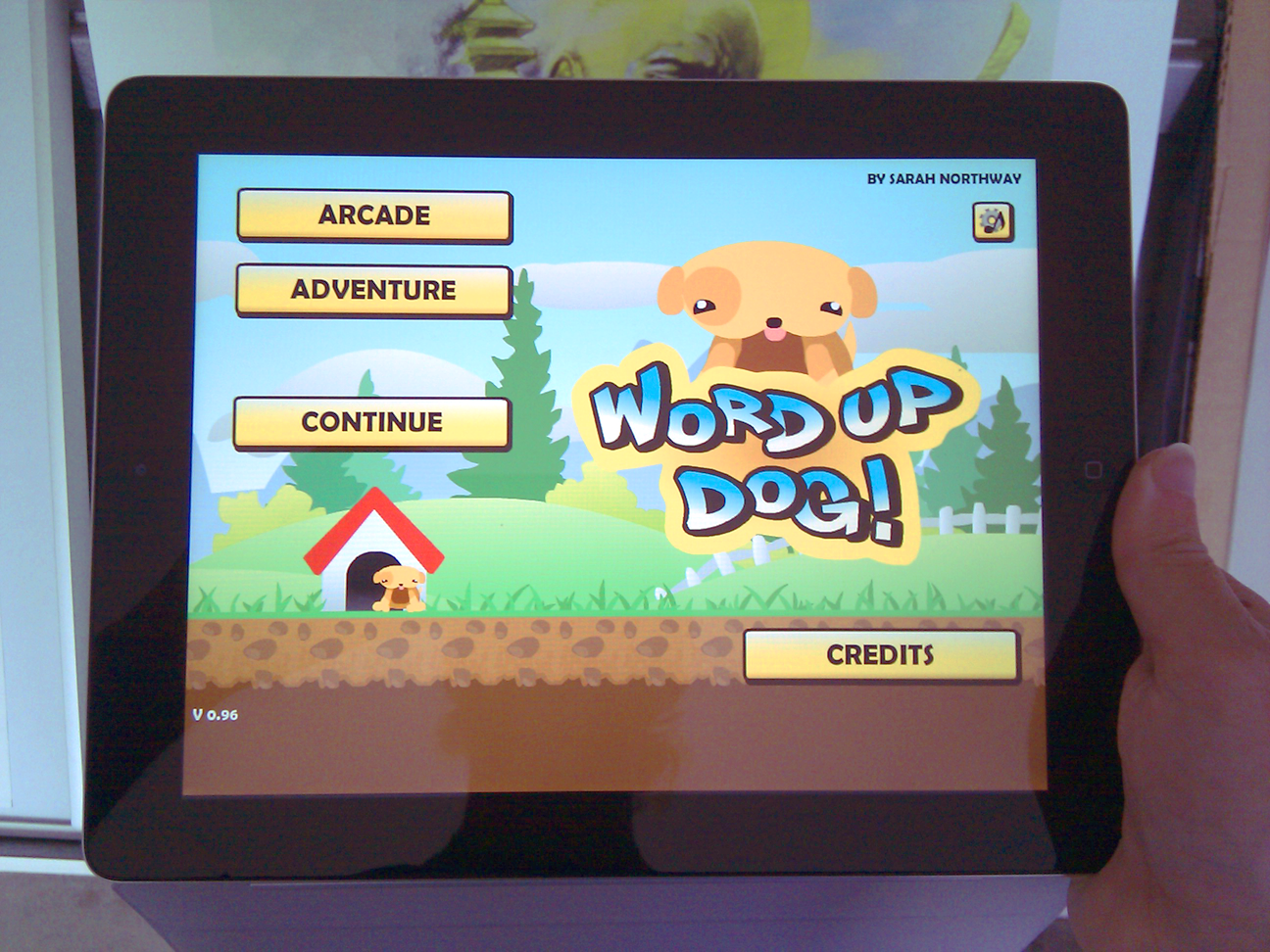
    Word dog on the iPad
    Word Up, iPad!

    I’d already optimized my new Flash game Word Up Dog to run on mobile phones, and used Air to package a version that I could sell in the Android app store. Now for the next challenge: the iPhone.

    Shortly after Adobe announced the tools for compiling Flash code into iOS apps, Apple banned the process as part of their ongoing spat with Adobe. Happily they retracted this bit of bs six months later, so we are free to experiment with Air for iOS once more. God knows if we’ll ever view Flash websites on an iPad browser, but this is a start.

    Building Air for the iPhone is similar to the Android process, but generating the security certificate requires paying Apple $99 for a developer license (Android is free), then dancing back and forth uploading and downloading files from their website. Although you need a Mac to write iOS apps in Objective-C, you can compile Flash AS3 code into iOS using Mac, Windows, or Linux. I used Windows, along with OpenSSL (instead of Keychain) to generate the security bits, and iTunes (instead of Xcode) to install the app onto my phone.

    Here are the steps:

    1. Download the Air 2.6 SDK, paste it into a copy of your Flex SDK directory, and set FlashDevelop to compile using the result
    2. Download OpenSSL
    3. Start a new FlashDevelop AIR AS3 project
    4. AddChild your existing game in Main.as
    5. Add NativeApplication handlers to prevent the phone from idling
    6. Modify your application.xml to add iPhone-specific settings
    7. Sign up for a $99 iOS developer account
    8. Generate a key by calling
      openssl genrsa -out SarahNorthway.key 2048
    9. Generate a certificate signing request with
      openssl req -new -key SarahNorthway.key -out WordDog.certSigningRequest -subj “/emailAddress=youremail@domain.com, CN=Your Name, C=US”
    10. On the Apple website, upload WordDog.certSigningRequest, create a provisioning profile for your iPhone and download WordDog.mobileprovision and developer_identity.cer
    11. Generate a pem file with
      openssl x509 -in developer_identity.cer -inform DER -out developer_identity.pem -outform PEM
    12. Generate the p12 certificate with
      openssl pkcs12 -export -inkey SarahNorthway.key -in developer_identity.pem -out WordDog.p12 -passout pass:yourpass
    13. Build your air project to create WordDog.swf
    14. Compile the final ipa file using
      adt -package -target ipa-app-store -provisioning-profile WordDog.mobileprovision -storetype pkcs12 -keystore WordDog.p12 -storepass yourpass WordDog.ipa application.xml -C . WordDog.swf Default.png iconsFolder (this takes a few minutes)
    15. In iTunes, drag WordDog.mobileprovision and WordDog.ipa into the library
    16. Find your game in the iTunes library apps, drag it onto your phone and sync

    Wheuf! A few extra steps and security files in there, but it’s all worth it, so we can sleep safe knowing nobody is installing homebrew apps on their own iPhones without paying Apple first.

    Sarah Working
    Me hard at work… or trying to beat Fate of the World?

    Unfortunately Air 2.6 only supports iPhone gen 3 and above, but this is probably for the best considering how much more processor intentive the Flash code seems to be compared to Objective-C code. Word Up Dog runs well on a 2nd gen iPad, but it still drops to 15 fps when moving the map around, so I’m going to have to go back to optimization before I can release it on the app store.

  • Rebuild 2: let’s get this arty started

    Characters Before
    The androgynous stickmen of Rebuild 1

    A couple weeks ago I posted looking-for-artist requests on Newgrounds, DeviantArt, TIGSource and FlashGameLicense, and got a couple dozen responses. I was kind of expecting more, seeing as it was a paid contract to work on the sequel to a popular game, and I was surprised at how many of the responders hadn’t even looked at the original game. I did however get a few very exciting responses from people who had played the game and were – bonus – great artists.

    Insanity 2 screen
    Insanity 2, now THAT's horror

    I chose EvilKris, creator of the Insanity and Insanity 2 point and click horror games. He works with 3D models and layers of texture to produce some truly dark, creepy images, far more realistic and disturbing than my clean and cutesy vector art from the first game.

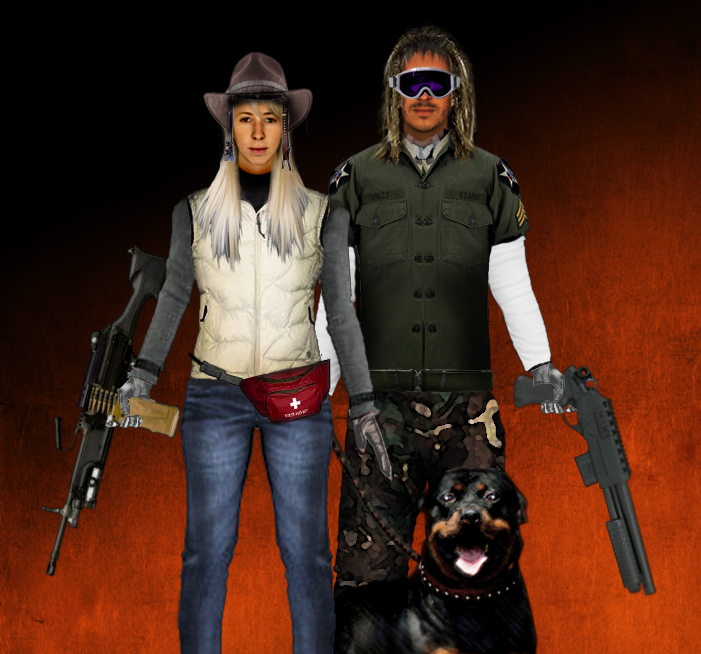
    EvilKris's character art in progress
    EvilKris's character art in progress – the one on the left uses my actual face!

    To start with he’s been working on characters and equipment to replace the old faceless stick figures, so you can really see the fear in your scavenger’s eyes as you equip her with a pistol and send her off alone to desperately scrounge for food at an Allmart teeming with the living dead.

    Next will be the gory stuff for the zombie attack sequence, which I’ve decided is not going to be a minigame after all. I’m going to spend more time instead expanding the strategic game, adding plot and NPCs, equipment resources, new buildings and new endings. I hope the sequel will have more replayability, but one thing is for certain: it’s going to have a more a darker more engrossing (and also more gross) visual style, which will fit better with the storyline.

    In other news, I recently did an email interview with Ethan Moses of HorribleNight.com where I talked a little about my inspiration for the game and the relative merits of zombies vs hive-minded insect aliens.