Month: April 2011

  • Word Up Dog: Creating Android apps with Adobe Air

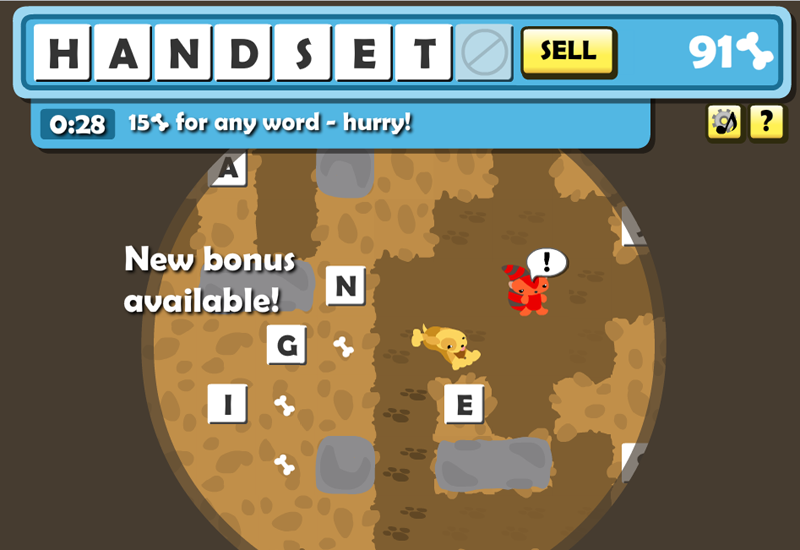
    A screenshot of Word Up Dog the game
    Word Up Dog: represent, yo!

    Having already optimized my game Word Up Dog so that it runs relatively well in a browser on an Android phone, I was ready to package it up as an installable app. Adobe Air makes this easy to do with few changes to your original code. Adobe has a Flash CS5 plugin to do it, but I prefer to do things the free-and-open way when I can, so here’s how I built the Android app using only FlashDevelop and other free Windows tools.

    First, I don’t recommend the Android emulator. I struggled with getting emulator-compatible versions of the Air packager and Air runtimes installed. There didn’t seem to be much advantage so use a phone if you can get your hands on one.

    I followed several tutorials and honed the process down to this:

    1. Download the Air 2.5 SDK, paste it into a copy of your Flex SDK directory, and set FlashDevelop to compile using the result
    2. Start a new FlashDevelop AIR AS3 project
    3. AddChild your existing game in Main.as
    4. Add NativeApplication handlers to prevent the phone from idling
    5. Add android-specific settings to application.xml (here, have mine)
    6. Generate a certificate using
      adt -certificate -cn WordUpDog 1024-RSA certificate.pfx yourpass
    7. Build your air project to create WordUpDog.swf
    8. Package the swf into an apk file with
      adt -package -target apk -storetype pkcs12 -keystore certificate.pfx -storepass yourpass WordUpDog.apk application.xml -C . WordUpDog.swf iconsFolder
    9. Upload WordUpDog.apk to your phone and baby, you’ve got a stew going
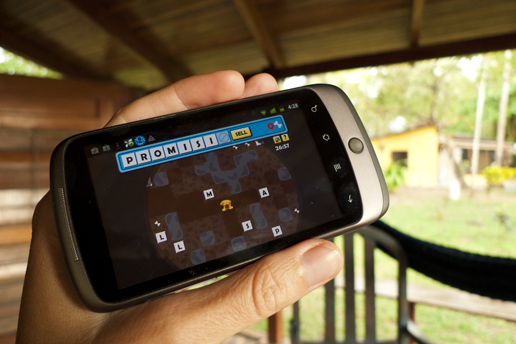
    Word Up Dog on a Nexus One
    Victory – the Air for Android app is installed!

    I was prompted to install the Air interpreter the first time I ran the game on my Nexus One, then it behaved just like any other app. The performance was about the same as running the SWF through the phone’s browser, but of course there are advantages to being installed. I could force the game to stay in landscape perspective and add a customized handler to deal with incoming phone calls. Not to mention being able to upload and sell it on the Android app store!

    Next I’ll tackle Air on the iPhone.

  • Word Up Dog: Flash optimization for mobile platforms

    Word Up Dog Splash Screen
    Word Up Dog: Yo Diggety.

    I just put my new game Word Up Dog up for bidding on FlashGameLicense. It’s very different from my first game Rebuild (I needed a break from zombies!). In Word Up Dog, you play a dog digging underground for letters to anagram, aided by cute animals who speak in 90’s hiphop lingo. It has a simple interface and can be played in short sessions, so it’s a good fit for mobile platforms like the iPhone, iPad and Android phones.

    When uploading a game to FlashGameLicense, one of the options is a “Mobile-ready” checkbox. Here’s what I did to make Word Up Dog mobile ready…

    I have a Nexus One Android phone, which unlike the iPhone can run Flash in its browser. So as a first test I pointed it at the totally unoptimized game swf. I was pleased to see the game load quickly and error-free, and the graphics looked good on the bright little screen. The SimpleButtons were easy to hit and the mouse over state even showed briefly. Movement using both the trackball (which fires up/right/down/left KeyboardEvents) and touch worked correctly. But the framerate was crappy, and touching even a blank area on the screen brought the game to a crawl.

    First, I looked at how I was rendering the map, a 800×550 sprite containing ~150 vector shape tiles. The tiles had cacheAsBitmap=true which had a noticeable effect on my pc, but it was hard to tell if it was doing anything on Android. Instead I manually drew each of the tiles to a Bitmap, which improved the framerate significantly. Drawing all the tiles onto one huge 800×550 bitmap was even better, but the way my tiles overlap made updating (by blitting) difficult.

    I improved the movement speed by jumping the screen from square to square instead of smoothly scrolling it. I downgraded the target fps from 30 to 24, and simplified the gui animations so that instead of fading in, notice text pops into existance. I replaced contrast, emboss and drop shadow filters with graphical approximations. I cached the dog’s shape tween animations as Bitmaps using TouchMyPixel’s AnimationCache. Each of these things had a small but helpful effect on the framerate.

    Now to tackle the touch issue. Holding down on any part of the screen lowered the framerate by 10fps, even after stripping out all MouseEvents. I couldn’t recreate it on pc (even via air at 250fps) or see evidence of it in a profiler. My guess is that Flash just isn’t very efficient at dealing with touch screens. What finally improved things was setting mouseEnabled=false and/or mouseChildren=false to everything in the game that isn’t meant to be clicked. This seems to be especially important for TextFields.

    Flash Preload Profiler
    Tracking memory with the Flash Preload Profiler

    Finally, memory. The free FlashPreloadProfiler told me I was using 50mb, and showed the number of instances of each class and time in functions. Adobe’s Flash Builder Pro profiler gave me additional info including function stacks and the momeory used by each class.

    I got my memory down to 20mb by instantiating some map-related things when they came into view rather than at game start. I verified that I didn’t have any memory leaks such as objects or handlers left around after exiting to menu and starting a new game.

    To recap my optimizations:

    • Draw shapes to Bitmaps instead of relying on cacheAsBitmap
    • Simplify gui animations
    • Cache character animations as Bitmaps
    • Remove filters
    • Set mouseEnabled=false and/or mouseChildren=false on non-clickables
    • Other best practices I follow include cutting down on EnterFrame events, avoiding masks, and using strongly-typed variables.

    I can now run Word Up Dog on my phone through Chrome at 20-24 fps! Not perfect and it will be slower on older phones, but I’m calling it a success. In my next post I’ll talk about packaging the game up using Air so I can sell it in the Android and iPhone app stores.